Bugs Thread - Dreams Update 2.44: Create Mode TLC Part #2 ⚙️🐛

Hey, CoMmunity! 👋
Back in September 2021, we released a batch of updates focused on Dreams’ Create mode, introducing a host of exciting changes and improvements to our creative toolset. Now it's time to set out eyes on Create Mode once again!
There's lots going on in this update! To find out more, read our release notes here: 👉 https://drms.me/dreams-v244 👈
If you have any issues downloading this update, reconnecting after the download is complete, or if you run into any bugs 🐛, please let us know in this thread. Our team will then investigate the issue as soon as possible! 💖
Edit 11/05/2022: We've now release update 2.45 for Dreams! This addresses a handful of bugs raised after last week's update. Thank you to everyone who gave us feedback and raised issues on the forums. 💖
Full details on the fixed bugs can be found here: https://drms.me/dreams-v245
-

Occasionally the downsampling slider will stop working. Worth noting that it only happened to me while I was playing the sound/music on a loop.
-

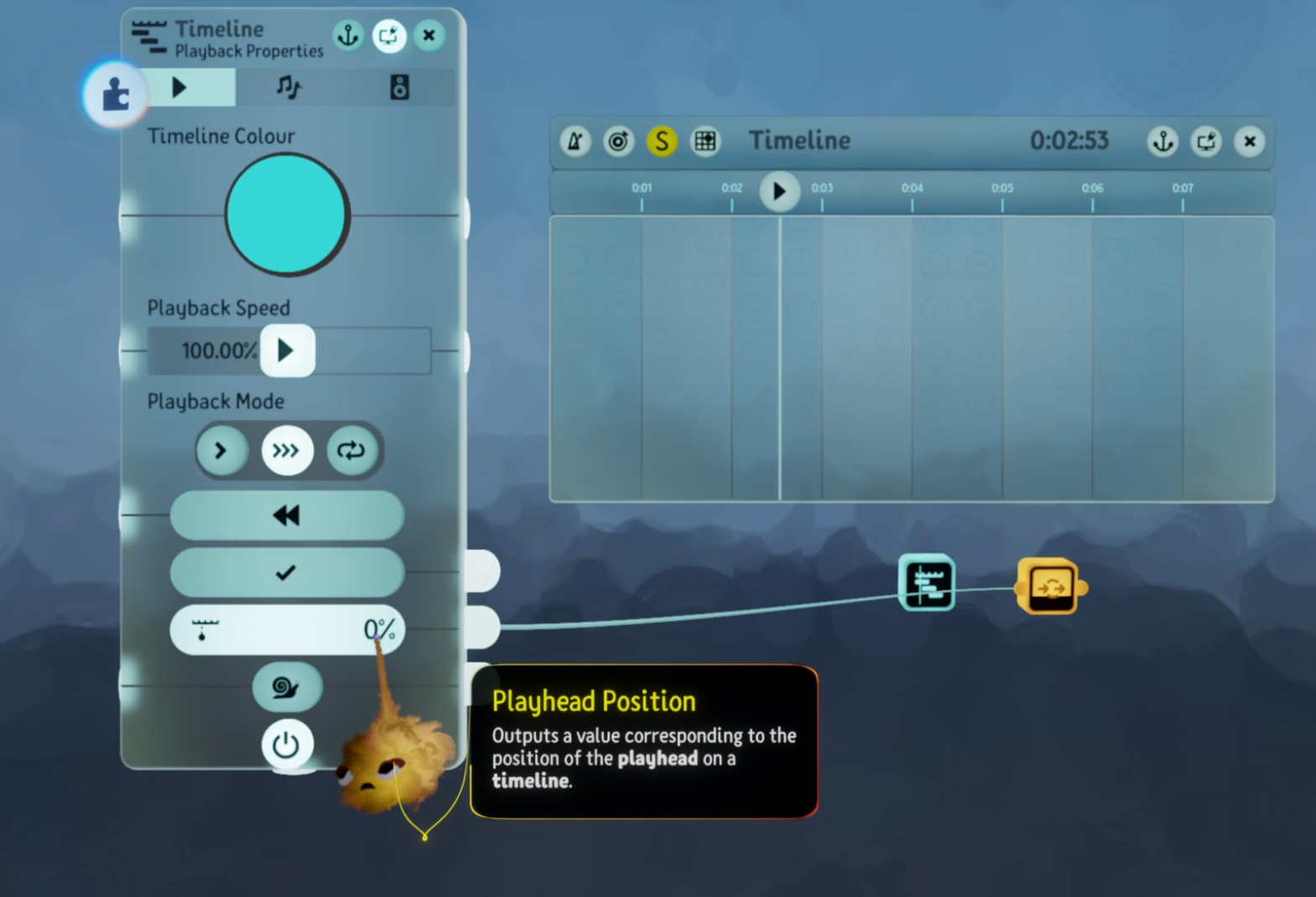
Im loving this update so much, thank you all at MM! I ran into a very minor bug with this new update that I thought you all should know. With timelines, the playhead position output number value does not update. I have attached an image to explain it better:
-

While the math of the new Wide Calculator's subtract operation is correct - subtract is neither commutative nor associative, so it has to choose a convention for order of operations, and it chooses the well known one leftmost first - the tooltip is wrong. Leftmost first means A - B - C is calculated as (A - B) - C, but the tooltip's description "Input 2 is subtracted from input 1 and the result is subtracted from input 3" describes C - (A - B).
-

When I press X twice and select every object in a scene, the convert to paint contextual button appears. I thought to myself oh ok this will I guess smartly detect which objects are sculpts and convert them into paint. But it somehow seems to destroy gadgets, sounds, everything. Thankfully you can of course undo the damage, but just be careful for now :)
-

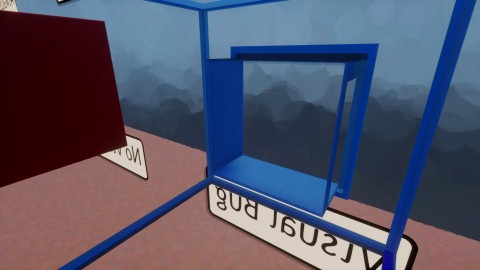
In play or view mode if you stick your camera (either free cam or a camera gadget) inside a sculpture that either has dynamic or always camera blocking on, the vignette does not appear nor does the object turn invisible. This produces an x-ray like visual bug. This does not occur in edit mode.
Also, for converting a sculpture to paint and you change the ruffle on the painting, the areas that are affected by the ruffle are scattered seemingly randomly throughout the painting. I assume this is a side effect from how the sculpture is painted in the conversion, so I don't know how preventable this is.
-
There are some gadget inputs for which the wire blend mode "overwrite" doesn't work for the new "date and time" fat wire type. So far, the inputs with this bug that I've discovered are the new time input of the Sun and Sky, the input of a Node, and the input of a Calculator. There may be a similar problem with the Wireless Transmitter and Wireless Receiver, but that will require more investigation to determine whether the problem is at the gadget input or in the wireless communication.
The input of the Splitter is one that's working correctly, so that can be used as a workaround - at a cost of two extra gadgets and eight extra wires.
-
(Attempting to help Mm by developing the bug reports...)
TheNamelesGhst12 Stop working in what way? Can you no longer drag the slider? Does the effect stop being applied? What situations does this happen in?: While performing into an effect field that applies the setting, while changing the setting while a note plays, etc.
coynem I saw that too ;p
TheBeardyMan Confirmed! LOL
Theboombringer2 I think that is how it's designed to work. When you "convert" anything into something else, the original thing no longer exists, and only the new version is there. Same applies to converting to paint, so I think it's working as intended. Definitely something for people to be wary of though. Also, it combines all selected sculpts into a single painting so they'll all move as one object--another thing to watch out for.
Suebob14 Sculpt setting: I tested this stuff on-stream yesterday and that bug didn't happen for me. Mm's stream also showed those settings and the bug didn't happen for them either. I have seen that weird glitchy rendering before, but super rarely and not to do with this setting. Was there something special about the way you set up your test, so we can try to reproduce it? Or maybe you could release the creation as remixable-unlisted and post the link so Mm can test.
Ruffle strangeness: Yeah I'm not sure what decides when a stroke ruffles by "rotating" as if it were on a sculpt's surface as opposed to ruffling in 3D. Honestly, I'd love a way of just straight-up controlling if ruffle does one or the other, myself. Sometimes rotating on one axis is preferable for me.
TheBeardyMan What did you mean by "overwrite doesn't work"? Just did some testing, and I saw the overwrite blend mode when plugging into each of your examples.
-
What did you mean by "overwrite doesn't work"? Just did some testing, and I saw the overwrite blend mode when plugging into each of your examples.
Yes, that OR gate icon does indeed appear when you're cycling through the blend modes on an input affected by this bug with multiple date & time fat wires connected. But that doesn't mean it's doing what it's supposed to:
- Start a new scene / element.
- Stamp a Time gadget.
- Stamp a Node.
- Stamp another Node.
- Stamp a Switch.
- Stamp a NOT gate.
- Stamp a Sun & Sky gadget.
- Wire the UTC output of the Time gadget to the input of one Node.
- Wire the Local Time output of the Time gadget to the input of the other Node.
- Wire the output of the Switch to the input of the NOT gate.
- Wire the output of the NOT gate to the power of the first Node.
- Wire the output of the Switch to the power of the second Node.
- Wire the output of the first Node to the Time input of the Sun & Sky gadget.
- Wire the output of the second Node to the Time input of the Sun & Sky gadget.
- Set the blend mode of the Time input of the Sun & Sky gadget to overwrite.
- Turn the Switch on & off.
Observed: The sun remains close to nadir, offset by the value of the Sun & Sky gadget's sun pitch tweak.
Expected: The sun alternates between two positions 15 degrees apart, one being where it should be for the UTC time and the other being where it should be for the local time.
Instead of wiring both Nodes directly to the Sun & Sky, you could wire them through a third Node and try to use the overwrite blend mode on that, but you'd get the same result. And if you wire two date & times to a Calculator's input and set its blend mode to overwrite, you'll see in the Calculator's tweak menu that it's not even recognizing it as a date & time - it's seeing a plain number.
Of course, in the first experiment, exactly one of the gadgets providing a date and time to the Sun & Sky gadget was fully powered and the other was unpowered. For that case, there's an easier workaround than splitting it with a Splitter - for which the overwrite blend mode works for date & time - and putting it back together with a combiner. You can set the blend mode to blend instead, which does work as expected for date & time fat wires.
-

Yo the vector operations “distance between vectors” and “vector length” output vectors instead of scalars. They output the largest fat wire input type, it would be great if they just output signals. Cheers.
-
Hey, coynem! 👋 Thank you for raising this. Our QA team have looked into this and have confirmed there is indeed a bug with timeline's playheads. The team will look into this further!
-
Hi, TheBeardyMan! 👋 Thanks for raising this to us. Our QA team have looked into this and have confirmed that the wide calculator's tooltip is slightly wrong. Sorry about that! We've raised the issue.
-
Hello, Suebob14! 👋 Sorry to hear that cameras seem to be misbehaving. We'll investigate!
-
Hello again, TheBeardyMan! Sorry to hear you've also ran into a problem with the Time & Date Gadget's fat wires. Those steps you've posted are super helpful - our team will investigate!
-
Special thank yous TAPgiles for helping everyone and asking questions about these possible bugs and issues! 💖
-
Suebob14 - So our QA team can investigate further, please could you send us a screenshot or a video (via a link) of the "x-ray" visual bug you're encountering? Alternatively, feel free to raise a support ticket with us here with any screenshots or videos you may have: https://indreams.me/support
-
Hi Glitch_Me_Up! 👋 Sorry to hear you've run into this problem with vector operations. We're aware of the issue and we'll be investigating further.
-
Hey is the link to a showcase featuring the visual bug https://indreams.me/element/osRqHxiAicV
Here are two photos of this occurring taken of the element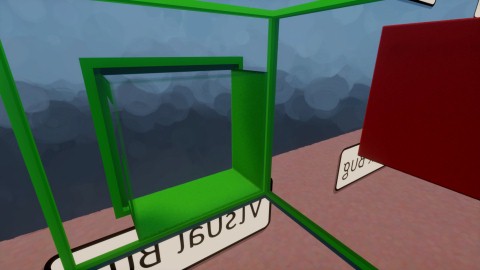
-
TheBeardyManLukeAndBeyond I've reproduced the effect with a quicker test. Seems wiring multiple into a splitter works fine. Wire them into a node first and then into a splitter and it doesn't know what the wire type is anymore. This could give you some more clues as to the cause. Here's footage of the test: https://youtu.be/JyUvqZD7U6A
-
Glitch_Me_Up LukeAndBeyond I noticed that problem on my stream the other day, and hypothesised regarding the cause. Here's the footage: https://www.twitch.tv/videos/1475546189?t=01h31m54s Another byproduct of this problem is that the result value is not shown on the output, because it's sending a 3-number wire. That's how I noticed it in the first place.
-
TheNamelesGhst12 Oh bizarre! Next time it happens, hit the SHARE button on your controller to capture the past X minutes in video. Then you can send that to Mm to show them what's happening.
-
Suebob14 LukeAndBeyond Seems this only is visible when not using a possessed puppet; just the freecam controls. I think in the old version, it would always vignette and hide the sculpt if you were in freecam mode. Also, when possessing a puppet, looks like there's a frame flash of the camera being inside the sculpt, so we see that frame glitch for a moment as it shifts to be in front of the sculpt. And even for the "never" sculpt there's a frame where you can see the glitch and then it goes away. (You may want to frame-step through the video to see it.)
So seems like the way the whole "you're in a sculpt, silly!" code is been changed to allow these new options, but that's messed up some stuff.
I've captured some footage testing it and demonstrating the issues we've found on this: https://youtu.be/Fz7kkI-8j_o
-
Thank you TAPgiles! I've passed on your YouTube video link to our QA team, who are investigating this problem with fat wires.
-
Converted painting's surface-snapped physical strokes not all behaving the same as hand-made physical strokes: Now, I grant you this is very finicky stuff to really nail down and prove what is happening. And my understanding of how physical paint works is not based on an Mm explanation but on my own (extensive) testing and conclusions. https://youtu.be/vJ7uHIrWv5M But assuming that's all sound...
It seems not all the generated strokes work the same way as hand-made surface-snapped strokes. In some way. For some reason. https://www.twitch.tv/videos/1475546189?t=3h4m41s You can see me making strokes by hand that work as expected. But some of the converted strokes work differently for whatever reason, which is quite frustrating. If this worked as expected, we could easily make squishy, wobbly jelly out of any sculpted 3D shape. I don't know if this is a bug or not, but that's my best guess so I'll put it here 😅
-
Luma Noise off not effective in some cases: A while back I figured out how that crazy multi-colour effect with the flecks of a sculpt. It sounded like that's what turning Luma Noise off would stop happening. But those multicolours are still there. They seem to have a more uniform brightness with Luma Noise off, but the setting was described as turning the colour variation on and off--which should take care of that multi-coloured variation I would assume. Not sure what's going on here, whether there's a bug, or this is an edge case, or the setting is mislabelled, or what...
Here's me testing and finding this problem: https://www.twitch.tv/videos/1475546189?t=4h23m22s
-

I don't know if this a bug or a weird quirk with the calculator but I think there is something wrong when it comes to rounding numbers. This happens depending on what you plug into it. I've had to wire up extra calculators to fix the problem. Though it is not a big deal, just something to point out.
Video link here:
https://www.youtube.com/watch?v=I8FxitV1X88&feature=youtu.be
-
ZeckFleck Something to note is, what you see on the slider is not the true number. It is rounded to the nearest 0.01. The way these numbers are stored in computer memory is such that integers aren't really a thing. You can get really close to an integer, but not exact. And as you're taking it from an orientation angle, it's actually converting from radians to degrees under the hood, which is more likely to give you a less precise value.
Instead of integers, you tend to get things like -90.000000034832764 or -89.9999998873783. Sliders don't show an infinite number of decimal places, so they tend to show just a couple rounded. But the number you're plugging in probably isn't exactly -90.
Then you're dividing, which likely changes it further, and could(?) make precision worse. Something like -9.00000726673 or -8.9999982782. But again, you're not really dealing with -9 exactly.
Then you're rounding up. If the real number is -9.00000726673 and you round that up (closer to 0) you'll get -9. But if the real number is -8.9999982782 and you round up you'll get -8. So that seems to be what's happening in this case.
This post is specifically for the update. This may be a random bug that was likely there before, and unrelated to any of the new features. My feeling is it's working as intended, even if it can seem unintuitive. But if you'd still like to report it you can use indreams.me/support in the normal way.
-
The vector function "cross product normalised" is correctly named, and is what the calculator outputs. But the iconography represents "normalise A and B before crossing." Which is different mathematically and would give a different result. So if you understand the mathematical notation, you will misunderstand what that option actually does.
Also applies for "dot product normalised" I believe. (Edit: I think the dot product one is correct, as it outputs a scalar anyway so there would be nor normalising that. Just the cross then.)
-
Hey TAPgiles! 👋 Thank you for raising these three new issues/bugs you've come across! In regards to the paint strokes issue, we're already aware that the physicalness of strokes from converting to paint can sometimes be a bit finicky and we hope to improve this in the future. For now, our QA team have raised this as a bug.
With the other two issues/bugs you've encountered, I've raised them with our QA team and they're investigating. 😊

댓글을 남기려면 로그인하세요.